Pickle Daily Planner Template for Real-World Productivity
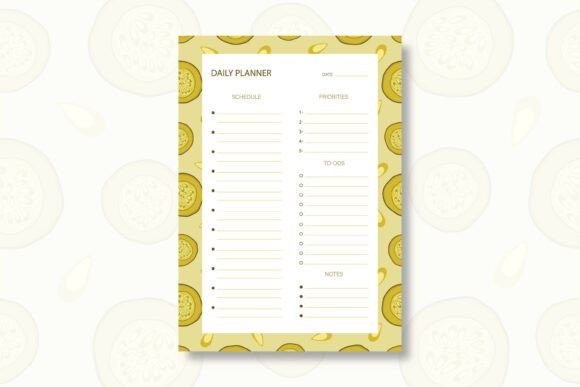
A good daily plan doesn’t have to be complicated. The Pickle Daily Planner Template offers a balance between structure and flexibility—something many of us need whether we’re running a business, managing a classroom, or just trying to stay on top of a freelance workload. Built with a hand-drawn aesthetic and delivered as a fully editable vector file, this template aims to help you organize your day without feeling rigid.
Hand-Drawn Design, Digital Precision
One of the first things you notice about the Pickle Daily Planner Template is its origin. It’s not generated by AI; it’s hand-drawn in Adobe Illustrator. That makes a difference in how it feels on the page. The lines have a natural, human quality—less sterile than a standard grid, but still highly functional. You get the best of both worlds: a design that feels personal and the precision of a vector file that can be scaled or edited without losing quality. At 300 DPI and A4 size, it’s print-ready whether you’re using a home inkjet or sending it to a commercial printer.
What’s Inside the ZIP
When you download the template, you’ll find everything neatly packed in a ZIP file. Here’s what’s included:
- EPS file (Editable): This is the core file. If you have vector editing software like Adobe Illustrator, you can adjust colors, move elements, resize sections, or add your own branding.
- PDF file: Perfect for quick printing or for sharing with clients and colleagues who don’t need to edit the design.
- JPG file: A high-resolution image that works well for digital note-taking apps (like GoodNotes or Notability) or for previewing.
A quick note on extraction: just double-click the ZIP file on most modern computers, or use a free tool like 7-Zip or WinRAR. Once extracted, you’re ready to edit or print.
Practical Uses Across Different Roles
This template works well in several environments because it doesn’t force a one-size-fits-all approach.
Professionals and Entrepreneurs
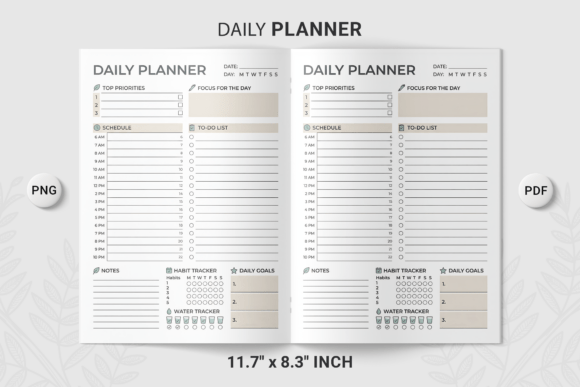
If you’re managing multiple projects, the Pickle Daily Planner Template gives you a dedicated space for priorities, tasks, and notes without overwhelming you with unnecessary sections. You can customize the fields in the EPS file to match your workflow—whether that’s client meetings, deep work blocks, or administrative catch-up.
Freelancers and Creatives
The hand-drawn aesthetic makes it a natural fit for creatives. It feels less corporate, which can make planning feel more like a creative ritual than a chore. You can print a stack at the start of the week, or keep the JPG version loaded on your tablet for daily use.
Educators and Students
Teachers can adapt the template for lesson planning, while students might use it for assignment tracking or study schedules. Because it’s A4, there’s enough room to write comfortably, and the straightforward layout means no time wasted figuring out how to use it.
Small Business Owners and Marketers
For anyone who runs content calendars or marketing workflows, this template can serve as a daily briefing sheet. Edit the EPS file to include custom categories, or print a master copy and photocopy it for team stand-ups.
How One User Adapts It
Let’s use a realistic example. A freelance graphic designer we know (let’s call her Maria) downloads the Pickle Daily Planner Template. She opens the EPS file in Illustrator and tweaks the header to include her logo. She adjusts the task list section to include a checkbox for client revisions, and adds a small note area for billing time. She exports a few JPGs for her tablet, prints a dozen for her desk, and keeps the PDF handy for client meetings. The hand-drawn feel actually matches her brand aesthetic, so she uses it as a quasi-marketing tool—placing it in the background of her workspace for client calls. It’s subtle, but it reinforces her identity as a creative professional who values intentionality.
Why These Formats Matter
The choice of EPS, PDF, and JPG isn’t random. Each serves a specific purpose:
- EPS (Editable) gives you full control. You can change fonts, colors, and layout without starting from scratch. This is crucial if you need brand consistency.
- PDF is the universal print-ready format. It preserves the design faithfully and works on any operating system.
- JPG is the most accessible. It opens on any device, making it easy to import into note-taking apps or upload to cloud storage.
This triple-format approach means you’re not locked into one tool or workflow. Whether you prefer digital planning, analog printing, or a hybrid approach, the template adapts.
Printing and Practical Considerations
At A4 size (210 x 297 mm), this template fits standard paper in most countries. The 300 DPI resolution ensures crisp text and clean lines when printed. For best results, use a laser or inkjet printer with good paper quality—around 80-100 GSM works well for daily use. If you plan to use it in a ring-bound planner, you might want to trim the edges slightly or print at 95% scale to fit certain binder systems.
A Few Recommendations
- For digital use: Import the JPG into your favorite note-taking app. Use a stylus for handwritten entries, or type over the template if the app supports text overlay.
- For analog use: Print a month’s worth at once. Consider laminating one copy to use with a dry-erase marker for repeated daily planning.
- For commercial use: The EPS file is ideal for rebranding and resale, but always check the license terms. If you’re a designer, this template can serve as a base for client deliverables.
Why Choose a Hand-Drawn Template Over Standard Options
In an age of AI-generated everything, there’s something refreshing about a design that was intentionally crafted by hand. The Pickle Daily Planner Template carries that subtle human touch. It doesn’t feel like a generic grid. It feels like something someone sat down and drew, line by line. That doesn’t just affect the aesthetics—it affects how you engage with it. When your planning tool looks good and feels intentional, you’re more likely to use it consistently.
A daily planner is only useful if it fits your life. The Pickle Daily Planner Template gives you the flexibility to make it your own—whether you’re a busy parent, a startup founder, or a solitaire designer. With print-ready files, editable vectors, and a design that stands out without shouting, it’s a practical addition to any productivity toolkit. And with the simple extraction and file management, you can get started within minutes of downloading. Thank you for choosing our product, and don’t forget to follow us for more tools that blend craft with everyday function.