Evaluating the Daily Weekly Journal Canva KDP for Your Planning Needs
For anyone exploring printable or self-published planners, the Daily Weekly Journal Canva KDP represents a specific category of product that combines template customization with print-on-demand flexibility. Whether you are a content creator, a small publisher, or simply someone looking for a structured personal organizer, understanding what this template offers—and where it has limitations—can help you decide if it matches your workflow or your audience’s expectations. This article provides a balanced evaluation of the template, examining its features, tradeoffs, and the scenarios where it performs best.
What Is the Daily Weekly Journal Canva KDP?
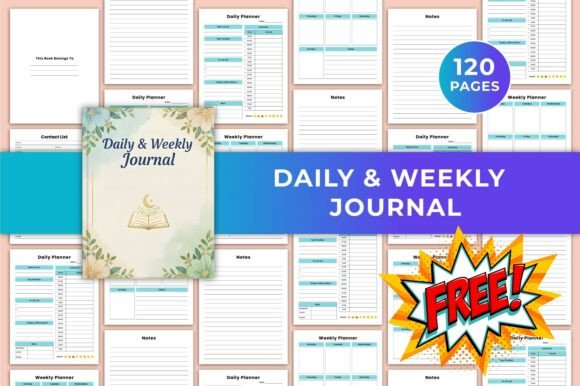
At its core, the Daily Weekly Journal Canva KDP is a fully editable Canva template designed for creating a combined daily and weekly planner, with additional note pages. The template is marketed for use with Amazon’s Kindle Direct Publishing (KDP) platform, meaning it is intended to be customized, exported as a print-ready PDF, and published as a paperback journal. It comes as a 120-page document in US Letter size (8.5 × 11 inches), with no bleed, and includes high-quality JPG and PNG files for cover or interior use. The template does not require any design software beyond Canva, which runs in a browser, making it accessible to users with varying levels of design experience.
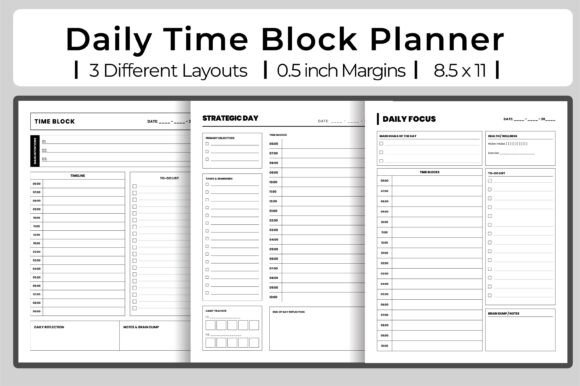
The template includes three primary section types: a daily planner page, a weekly planner page, and a notes page, plus an introductory “This Belongs To” page. Because every page is editable in Canva, users can modify fonts, colors, layouts, and even add or remove pages before exporting the final file. This flexibility is the main draw for self-publishers who want to produce a professional-looking journal without hiring a designer or learning complex layout software.
Why Consider This Template? Motivations and Use Cases
People are typically drawn to the Daily Weekly Journal Canva KDP for one or more of the following reasons:
- Low barrier to entry for self-publishing. If you want to publish a journal on Amazon KDP but have no design background, a fully editable Canva template removes the steep learning curve. You simply customize the text and colors, then download a print-ready PDF.
- Speed of production. Starting from a pre-structured template saves hours of layout work. With 120 pages already organized, you can focus on branding and content rather than page setup.
- Control over aesthetics. Because the template is editable, you can match the journal to a specific color palette, add your own logo, or adjust typography to appeal to a particular niche audience.
- Low upfront cost. Compared to hiring a designer or purchasing advanced software like Adobe InDesign, a single template purchase is inexpensive. You can then publish multiple variations by changing the styling.
- Printed or digital use. While the template is designed for KDP print, the included JPG and PNG files also allow for digital distribution (such as a fillable PDF or GoodNotes import), giving you optionality.
Benefits: Where the Template Excels
In practical terms, the Daily Weekly Journal Canva KDP offers several clear advantages for a specific kind of project. First, the structure is straightforward. Daily and weekly spreads are common in the planning community, and this template provides a familiar, functional layout that does not require explanation. The inclusion of a notes section adds flexibility for brainstorming, gratitude journaling, or miscellaneous recording.
Second, Canva’s editing environment is intuitive. Changing fonts, adjusting colors, and moving elements are all point-and-click operations. This means a user with no HTML or CSS knowledge can still produce a cohesive, print-ready document. The template also specifies “no bleed,” which simplifies the export process for KDP—there is no need to account for content being trimmed off during printing.
Third, the file format support (PDF, JPG, PNG) covers the main output channels. You can upload the PDF directly to KDP, use the JPGs for a low-resolution preview, or repurpose the PNGs for digital planner pages. This multi-format approach is helpful if you want to test different product types without recreating the design from scratch.
Tradeoffs and Considerations
No template is a perfect fit for every project, and the Daily Weekly Journal Canva KDP has notable tradeoffs that should be weighed before purchase or publication.
Limited customization depth. While the template is fully editable in Canva, Canva itself has constraints compared to professional layout software. For example, precise typographic control (such as leading, kerning, and paragraph styles) is limited. If you require exacting typographic standards or complex multi-column layouts, you may find Canva’s tools insufficient. Similarly, the template is a fixed 120-page structure; adding or removing pages requires manual duplication or deletion within Canva, which can be tedious for large changes.
No bleed can be a limitation. The “no bleed” specification means content is contained within standard margins. For some self-publishers, a no-bleed interior is perfectly acceptable and simplifies setup. However, if you want full-bleed designs—where background colors or images extend to the edge of the page—this template would need modification, and the current format does not support that without manual resizing.
US Letter size only. The template is fixed at 8.5 × 11 inches. If you intend to publish in a different trim size (such as 6 × 9 inches or A5), you would need to resize the entire document within Canva, which can distort elements and require significant rework. For KDP, US Letter is a common size, but it is not the only option, and being locked into one size reduces flexibility.
Generic layout may require differentiation. Because this is a template available to other KDP publishers, there is a risk that multiple journals using the same underlying layout (with different colors and fonts) could look similar to buyers. If differentiation is important for your brand, you may need to invest additional time in customizing the structure—for example, rearranging page elements or adding unique prompts—beyond simple recoloring.
Digital-only considerations. If you plan to sell the journal as a digital product (for example, on Etsy or Gumroad), the 120-page count and US Letter size may feel bulky for some users. Digital planners often work better in smaller or hyperlinked formats. This template is not hyperlinked, so navigation in a PDF reader would require manual scrolling.
When Is This Template a Strong Fit?
The Daily Weekly Journal Canva KDP works well in several specific situations:
- First-time self-publishers. If you want to publish a physical journal on Amazon KDP with minimal risk and fast turnaround, this template provides a solid starting point. You can have a finished product ready in a few hours.
- Niche customization. If you are targeting a specific audience (such as students, professionals, or hobbyists) and only need to adjust colors and cover design, the editable template lets you produce a niche-specific journal without starting from scratch.
- Testing a market. If you are unsure whether a printed planner will sell, this template allows you to create a low-cost prototype. You can publish a small run, gather feedback, and decide whether to invest in a more custom design later.
- Bundled products. Because the template includes multiple file formats, you could use the PDF for print and the PNGs for a digital companion product, giving you two potential revenue streams from one design effort.
- Personal use. If you want a personalized daily and weekly planner for yourself and do not intend to publish, the template is straightforward to customize and print at home.
When Might Alternatives Be Worth Considering?
There are also scenarios where other options may be more appropriate:
- Complex layouts or full-bleed designs. If your project requires full-bleed printing, multiple column layouts, or intricate graphical elements, professional software like Adobe InDesign, Affinity Publisher, or even a dedicated KDP template with built-in bleed would be more reliable.
- Multiple trim sizes. If you plan to publish the same journal in different sizes (e.g., a pocket size and a letter size), a template that supports multiple sizes natively—or one designed for a scalable vector format—would save time. This template is locked to US Letter.
- Interactive digital planners. If the primary audience wants hyperlinked tabs, fillable form fields, or compatibility with annotation apps like GoodNotes, you would need a PDF with embedded links and form elements. This template does not include those features.
- Unique page structures. If your journal concept calls for non-standard pages—such as habit trackers, month-at-a-glance spreads, goal-setting worksheets, or dot-grid pages—this template provides only daily, weekly, and notes pages. You would need to build the additional page types yourself in Canva, which may be time-consuming.
- High-volume publishing with consistent branding. If you plan to publish a series of journals with a consistent brand identity across multiple titles, a branded template created in a more robust design tool will give you greater control over repeatable styles, master pages, and batch export.
Practical Decision-Making Insights
To determine whether the Daily Weekly Journal Canva KDP aligns with your goals, consider the following questions:
- What is your primary output channel? If you are publishing exclusively on Amazon KDP in US Letter size, this template is a natural fit. If you plan to sell on other platforms or in other sizes, factor in the effort needed to adapt the file.
- How much customization do you actually need? If your customization plan is limited to changing colors and fonts, the template works well. If you need to add many new page types, restructure the layout, or create a completely original look, you may be better off starting from a blank Canva canvas or using a different tool.
- What is your tolerance for similarity? Search for similar journals on Amazon to see how many use comparable layouts. If differentiation is critical, plan to invest additional time in customizing the template beyond surface-level changes.
- Are you comfortable with Canva’s limitations? Canva is excellent for certain tasks, but it is not a replacement for dedicated layout software. If you find yourself fighting against the tool—especially regarding typography, page numbering, or alignment—it may be worth exploring alternatives.
- Do you need digital functionality? If you want a digital planner with interactivity, look for a template specifically built for that purpose, or plan to use additional software (such as a PDF editor) to add links and form fields after export.
Helping You Determine Alignment
Ultimately, the Daily Weekly Journal Canva KDP is a practical, accessible tool for a specific use case: producing a printed daily and weekly planner in US Letter size with minimal design effort. It is not the right choice for every project, and its limitations around bleed, size, layout complexity, and digital interactivity are real constraints. However, for the person who wants to get a functional, well-structured journal to market quickly and affordably, it delivers on its core promise.
Before making a decision, review the template’s page previews carefully. Count the number of daily versus weekly spreads, and consider whether 120 pages is enough for your intended audience’s planning period. If the template’s page breakdown matches your needs and your publishing plan fits within its constraints, it can be a cost-effective and time-saving solution. If your project requires more flexibility, different formats, or a higher degree of originality, the additional effort of designing from scratch or sourcing a more specialized template may be worth the investment.