Daily Time Block Planner: KDP Interior for Productivity
Time is the one resource you can’t buy more of. Yet most of us treat it like an endless river, hoping we’ll somehow get everything done. A Daily Time Block Planner flips that passive approach into an intentional system. It’s not just another diary. It’s a framework that helps you map your day into focused chunks, defend those chunks from distractions, and turn intention into action. For creators, entrepreneurs, and anyone juggling multiple roles, this kind of structure can be the difference between spinning your wheels and making real progress.
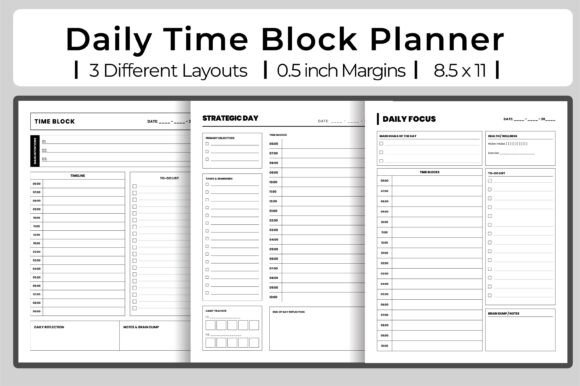
The KDP interior version of this planner comes with three distinct layouts, each designed for a slightly different rhythm. Three PDF files, each 120 pages long, give you a full quarter’s worth of planning space. Add in high-resolution JPGs, 300 dpi printing quality, and a standard 8.5″ x 11″ trim size with no bleed, and you have a ready‑to‑upload product for Amazon KDP that’s both professional and customizable. But the real value lies in how you use those layouts—and how your audience can adapt them to their own workflows.
Why a Time Block Planner Works
Time blocking isn’t a new idea. It’s been used by everyone from Elon Musk to Benjamin Franklin. The principle is simple: instead of a to‑do list that you shuffle all day, you assign specific blocks of time to specific tasks or themes. This turns your calendar into a decision‑making tool. When you know that 9:00 to 10:30 is reserved for deep creative work, you don’t have to keep deciding what to do next. You just follow the plan.
A Daily Time Block Planner takes that principle and adds a journaling layer. You’re not just scheduling—you’re also reflecting, adjusting, and setting strategic intentions. The result is a hybrid productivity tool that works as both a tactical planner and a strategic day journal. For KDP publishers, this dual purpose makes it appealing to a broad audience: freelancers who need to protect their focus, bloggers who plan content weeks ahead, and small business owners who want to align daily actions with quarterly goals.
Exploring the Three Layouts
The KDP interior includes three distinct variations. Each one offers a different way to approach your day. Understanding these differences helps you market the planner to specific user needs—or adapt the layouts for your own use if you’re the creator.
Layout 1: The Classic Block Grid
The first layout is the most straightforward. It presents a grid of time slots, typically from 6:00 AM to 10:00 PM, with each slot representing a half‑hour or hour block. Next to each block, there’s space to write the task or theme. A small notes area at the bottom allows for daily priorities or reflection. This layout is ideal for people who prefer structure and want a visual map of their entire day.
Example use case: A freelance graphic designer uses this layout to block out client work in the morning (10:00–12:00), administrative tasks after lunch (1:00–2:00), and creative exploration in the late afternoon (3:00–4:30). The notes section captures quick ideas that pop up during the day. The designer can see at a glance whether they’re over‑scheduled and can adjust on the fly.
Layout 2: Priority + Time Blocks
The second layout shifts focus from pure scheduling to prioritization. At the top, there’s a “Top 3 Priorities” box, followed by a “Time Blocking” section where you can assign those priorities to specific hours. Below, a “Reflection” line invites you to note what worked and what didn’t. This layout is great for people who want to be intentional about their most important tasks before they start filling in time slots.
Example use case: A blogger planning a content calendar uses this layout to decide the three most critical tasks for the day: write the newsletter, outline a blog post, and record a short video. Then they block time for each, leaving flexibility for unexpected edits. The reflection line helps them see patterns—like always underestimating how long writing takes—which they can adjust in future weeks.
Layout 3: Strategic Day Journal
The third layout is the most reflective. It combines a time blocking grid with a journaling section. There’s space for a morning intention, a midday check‑in, and an evening review. The planning area still has hourly blocks, but the emphasis is on learning from each day rather than just squeezing tasks in. This is ideal for entrepreneurs, educators, and anyone who wants to align daily actions with longer‑term goals.
Example use case: A small business owner uses this layout to start the day by writing an intention (e.g., “Focus on client outreach”). At midday, they note progress and challenges. In the evening, they review what moved the needle. This practice turns the planner into a strategic tool rather than a simple schedule. Over a month, the journal entries reveal recurring obstacles and successful patterns, which can inform next month’s strategy.
Adapting the Planner for Different Audiences
One of the strengths of this KDP interior is its versatility. The three layouts can be marketed to different niches within your audience. Here’s how you can position them.
- For students and educators: Emphasize the grid layout for class schedules, study blocks, and assignment deadlines. Add a section for weekly goals at the back if you customize the file.
- For marketers and content creators: Highlight the priority‑based layout. Marketers often juggle multiple campaigns, and setting top three priorities each day keeps them from spreading too thin. Suggest using the reflection line to track which tasks actually move the needle.
- For freelancers and solopreneurs: Recommend the strategic journal layout. Solopreneurs need to wear many hats—sales, delivery, admin—and the daily reflection helps them spot which hat they’re overusing. It also helps maintain work‑life balance by showing where time leaks occur.
- For hobbyists or side‑project builders: The classic grid is perfect for carving out 30‑minute blocks for learning, practicing, or creating. Many people who are building a side business or learning a new skill find that simply seeing the time blocked in advance increases their consistency.
You can also bundle the three PDFs into a single product listing with different cover options. Since each file is 120 pages, a user could rotate between layouts month by month. That flexibility adds perceived value.
Practical Inspiration: Customizing the Interior
Because the interior is delivered as PDF and JPG files at 300 dpi, you have the freedom to customize before uploading to KDP. Here are a few ways to add value for your buyers without losing the original layout.
- Add cover templates: Pair each layout with a matching cover design. The 8.5″ x 11″ size is standard, so you can create cohesive branding across the series.
- Insert bonus pages: At the beginning or end of the PDF, include a page on “How to Use Time Blocking Effectively” or a monthly overview spread. Since the file is editable, you can add up to 10 extra pages without affecting the main content.
- Create a bundle: Offer all three layouts as a combination “Time Blocking Master Kit.” Include a separate index or instructions. Amazon KDP allows you to upload multiple interior files for the same book if you’re using a paperback with different versions—but for simplicity, one file with all three layouts works well.
- Add a habit tracker: The strategic journal layout already has reflection areas. You could expand that into a weekly habit tracker that lives alongside the daily pages. This appeals to the wellness and self‑improvement niche.
How to Keep Results Clear and Effective
When you design or use a Daily Time Block Planner, clarity is everything. The purpose is to reduce decision fatigue, not add to it. Here are a few principles to keep in mind—whether you’re the creator or the user.
Keep the layout uncluttered. White space is your friend. The no‑bleed design of this KDP interior already ensures nothing gets trimmed off, but avoid adding too many icons, shading, or decorative elements that could distract from the function. The grid should be easy to read at a glance.
Use consistent time intervals. All three layouts in this set use hourly blocks with half‑hour markers. That consistency helps users build a habit. If you customize, keep the intervals uniform across layouts so switching between them is smooth.
Make reflection easy. The strategic journal layout excels here because it prompts the user at specific moments. If you’re adapting the other two, consider adding a small “End of Day: Win & Lesson” line. It doesn’t need to be long—just enough for a sentence.
Test with real users. Before publishing, print a few pages and try them for a week. Note where you get stuck. Does the priority box help you focus, or do you prefer the pure grid? That real‑world feedback is the best way to ensure your final product is genuinely useful.
Balancing Inspiration with Practicality
A Daily Time Block Planner is ultimately a practical tool. But the reason it inspires is that it gives you permission to be intentional. When you block time for creative work, you’re treating that work as important. When you reflect on your day, you’re respecting your own growth. That blend of structure and self‑awareness is what makes this kind of planner valuable for people who want more than just a to‑do list.
For KDP publishers, the three‑layout approach means you can serve multiple audiences with one interior design. The high‑resolution, print‑ready files reduce technical headaches. And the 120‑page length—easily adjustable if you want to offer 60‑day or 90‑day versions—gives you flexibility in pricing and format.
Whether you’re creating this planner for yourself or selling it to others, the key is to remember that time blocking is a skill. The planner is just the container. The real magic happens when someone sits down, looks at their day, and makes a conscious choice about where to invest their next hour. That small act, repeated daily, builds momentum. And momentum is what turns plans into results.