AI Content Creation Guide: A Practical Workflow Resource for Modern Creators
Creating content consistently, with quality and purpose, is one of the most demanding tasks for anyone working in digital media. Whether you are a freelancer juggling multiple clients, a marketer planning a quarterly campaign, or an educator developing course materials, the pressure to produce fresh, relevant, and engaging material never lets up. The AI Content Creation Guide enters this picture not as a theoretical overview of artificial intelligence, but as a hands-on, step-by-step workbook designed to help you integrate AI tools directly into your existing processes.
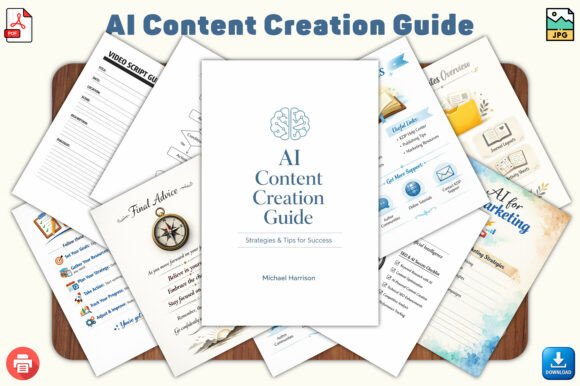
This 32-page ebook, crafted in a clean, minimal Canva-inspired style, is built for practical use. It moves beyond generic advice and offers a structured framework that you can apply before, during, and after any content project. Its value lies not in what AI can do in the abstract, but in how you can direct it to produce results that align with your specific goals, audience, and quality standards.
Where the AI Content Creation Guide Fits in a Broader Process
Content creation is rarely a single event. It is a cycle that includes planning, research, drafting, refinement, publishing, and analysis. The AI Content Creation Guide is designed to plug into multiple stages of this cycle. It is not a tool you open once and set aside. Instead, it functions as a reference you return to when you need to refine your prompts, structure a post, or troubleshoot a creative block.
For example, before you begin writing a blog post, the guide helps you define your audience, clarify your angle, and choose the right format. During the drafting phase, its prompt-writing techniques allow you to generate outlines, headlines, and body paragraphs that match your tone. After publishing, the workflows and checklists help you repurpose content across social media, email, or video. This positions the guide as a process companion rather than a one-time read.
Using the Guide Before a Project: Preparation and Planning
The most effective content starts with clarity. The AI Content Creation Guide dedicates significant space to preparation, helping you avoid the common pitfall of asking AI vague questions and receiving generic answers. The step-by-step framework encourages you to map out your objectives, identify your target audience, and specify the desired outcome before you open any AI tool.
Practical implementation tips from the guide include:
- Defining the content type: Blog, social post, video script, or email. Each format requires a different structure, and the guide provides specific strategies for each.
- Setting constraints: Word count, tone, key messages, and call-to-action. These parameters improve the quality of AI output significantly.
- Preparing reference material: The guide suggests gathering brand guidelines, competitor examples, or previous high-performing content to feed into your AI prompts.
Using the guide at this stage reduces wasted effort and ensures that the AI tools you use later operate within a clear framework. It turns a scatter-shot approach into a deliberate process.
During Content Creation: Execution and Iteration
Once you have a plan, the AI Content Creation Guide becomes your execution manual. Its prompt writing techniques are among the most immediately useful sections. Rather than offering generic tips like "be specific," the guide provides actual templates and example prompts that you can adapt to your niche.
For instance, when writing a social media post, you might use a prompt structure that includes the platform, the audience's pain point, the desired emotion, and a call to action. The guide walks you through how to layer these elements so that the AI responds with content that feels human and targeted.
During this phase, the guide also introduces workflow systems for productivity. These are not theoretical productivity hacks but practical sequences. A typical workflow might involve:
- Generating three headline options using a structured prompt.
- Selecting the strongest and using it as the anchor for a short draft.
- Running the draft through a refinement prompt that focuses on clarity and conciseness.
- Checking the output against a quick-start checklist included in the guide.
This iterative process keeps you in control while leveraging AI for speed. The guide emphasizes that you are the editor and strategist, not the typist.
After the Project: Refinement, Repurposing, and Scaling
Content creation does not end when you hit publish. The AI Content Creation Guide includes strategies for what happens next. One of its strongest sections covers repurposing. A single blog post can become a LinkedIn article, a Twitter thread, a short video script, and an email newsletter. The guide provides templates for each of these transformations, saving hours of rework.
Additionally, the guide addresses monetization and freelancing guidance. For freelancers and entrepreneurs, this is where the guide moves from creative support to business tool. It covers how to package AI-assisted content as a service, how to set pricing, and how to maintain quality across multiple clients. The checklists included help you maintain consistency even when you are scaling your output.
Long-term use is supported by the guide's layout. The clean, icon-driven design makes it easy to return to a specific section without rereading the entire book. It is structured for reference, not just initial consumption.
How the Guide Interacts with Other Tools and Methods
The AI Content Creation Guide is tool-agnostic in the best sense. It does not depend on a specific AI platform, though it naturally references the most common ones. This means it works alongside ChatGPT, Claude, Jasper, Copy.ai, or any other language model you prefer. The focus is on the method, not the interface.
For users who already have established workflows using project management tools like Notion, Trello, or Asana, the guide's templates and checklists can be transferred directly. You can copy the prompt structures into a document, save the checklists as recurring tasks, and integrate the workflow sequences into your existing processes. The guide is designed to be flexible rather than rigid.
It also complements other educational resources. If you have taken courses on copywriting, SEO, or social media strategy, the AI Content Creation Guide fills the gap between knowing the theory and executing it with AI assistance. It bridges the skills you already have with the efficiency that AI offers.
Practical Implementation Tips for Smooth Integration
Integrating a new resource into a routine can feel disruptive. The AI Content Creation Guide minimizes this friction through its structure. Here are some observations on how to adopt it without overhauling your current system:
- Start with one section: Do not try to implement everything at once. Begin with the prompt writing techniques and apply them to your next piece of content. Once that feels natural, incorporate the blog or social media strategies.
- Use the checklists as a bridge: Print or save the quick-start checklists. Place them next to your workspace. They serve as a physical or digital reminder of the process until it becomes habit.
- Adapt the templates to your voice: The example prompts and workflows are starting points. Modify them to reflect your industry, audience, and personal style. The guide encourages this flexibility.
- Pair with a content calendar: The guide's monetization and workflow sections work best when you have a regular publishing schedule. Use the guide to prepare batches of content in advance, then schedule them using your preferred platform.
Quality Control and Consistency Over Time
One concern that arises with AI-assisted content is maintaining quality and brand voice across many pieces. The AI Content Creation Guide addresses this directly through its emphasis on structured prompts and refinement workflows. By using the same prompt framework each time, you create a consistent foundation. Then, by applying the refinement steps, you ensure that the final output meets your standards.
The guide also encourages the use of brand bibles or style guides as input. When your AI tool has access to your preferred vocabulary, tone, and formatting rules, the output becomes more predictable. Over months of use, this consistency builds trust with your audience and reduces the time you spend editing.
For teams, the guide can serve as a shared reference. Multiple writers or content managers can use the same templates and processes, ensuring that content produced by different people still feels cohesive. This is especially valuable for agencies, marketing departments, or publishers who need to scale without losing quality.
Long-Term Value and Adaptability
The AI Content Creation Guide is not tied to a specific version of an AI tool or a fleeting trend. Its principles are based on how language models work at a fundamental level: they respond to clear, structured input. As long as that remains true, the guide will remain relevant. The prompt writing techniques, workflow systems, and checklists are transferable to new tools as they emerge.
For creators who are just beginning with AI, the guide offers a safe on-ramp. It demystifies the process and provides guardrails that prevent common mistakes like over-relying on AI without editing or using vague prompts that produce generic text. For experienced users, the guide offers refinements and organizational structures that make their existing workflows more efficient.
The ebook's format also supports long-term use. The 6 × 9 inch KDP-ready size is practical for printing and annotating. The clean, white background with modern icons makes it easy to scan for the information you need. Whether you keep it as a PDF on your desktop, print it for a binder, or upload it to a tablet, the layout supports quick reference.
A Resource That Grows With You
As your content needs evolve, the AI Content Creation Guide adapts. A freelancer starting out might focus on the monetization and freelancing sections, using the templates to build a portfolio. A year later, the same freelancer might return to the guide to refine their video content strategies or to audit their workflow for efficiency gains. The guide is dense enough to support multiple passes, each time revealing new applications.
For educators and coaches, the guide can be used directly as teaching material. Its step-by-step format and clean visuals make it suitable for workshops or courses on AI content creation. Students can follow the framework, practice with the templates, and develop skills that apply to real-world projects.
Publishers and KDP sellers will also appreciate the guide's readiness for digital upload and print. The file specs are clear, and the design is professional out of the box. It serves both as a product to sell and as a tool to improve your own content operations.
Final Observations on Using the AI Content Creation Guide
The most effective resources are the ones that reduce friction without adding complexity. The AI Content Creation Guide achieves this by giving you a repeatable structure for every stage of content creation. It respects your existing knowledge and experience, offering ways to integrate AI without losing your voice or your standards.
If you are looking for a way to make AI a consistent, reliable part of your creative workflow, this guide provides the scaffolding. It is not about replacing your skills, but about amplifying them with a process that saves time, reduces guesswork, and produces results you can stand behind.
Use it before you write to clarify your direction. Use it during creation to execute efficiently. Use it after publishing to extend the value of your work. That is where the real return on investment lies.